Clock in on LINE, from the phone each person already has.
Staff tap in and out inside LINE. WorkCo checks the phone is inside the shop's radius and measures the time against the assigned shift, so you know who was late and by how much. No scanner, no app.
One tap in LINE. The system does the rest.
On arrival the employee taps Check in. The system checks the phone is inside the branch radius; outside it, it shows how many metres away and refuses the check in.
The tap is measured against that person's shift that day, not the shop's opening hour: a shift at 09:00 and a tap at 09:10 is ten minutes late. The hours worked are the same figures payroll uses, never retyped.
- Check in and out inside LINE. No app, no new password
- A radius per branch: default 200 metres, adjustable from 50 to 1,000
- A LINE reminder 5 minutes before the shift starts and before it ends
- An account that only sends rosters can hide the check in button
Know when it happens, not at the end of the month
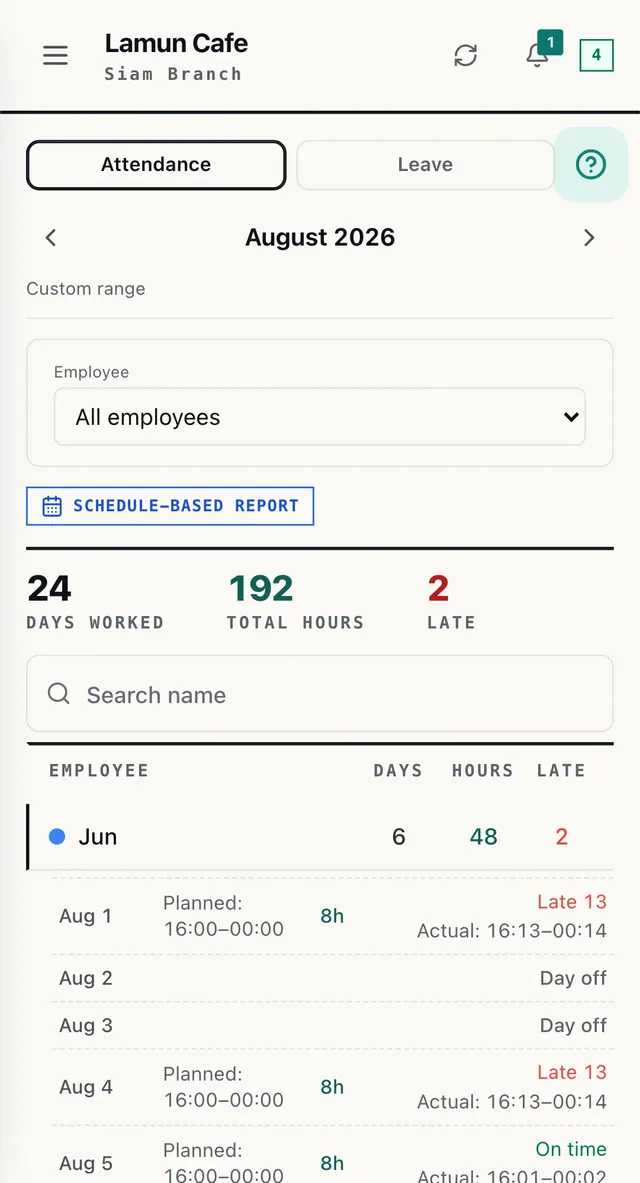
A late tap is recorded in minutes at that moment, stamped Late beside the name on the day's roster, and added to the manager's notifications. A grace period is set in each contract, for example the first 5 minutes not counted.
- Ten minutes after a shift starts, a LINE card to the owner can list who is in and who is missing
- Tomorrow's shift previewed in LINE at 20:00, so fewer people come in for the wrong shift
- One attendance report across every branch: who was late, how often, how many minutes, days worked
- Reports export to a file for your accountant
No scanner, so no day the scanner is down
The day a scanner by the door fails, nobody can clock in until a technician arrives, and that month is rebuilt by hand. WorkCo uses the phone each person already carries, and staff out on deliveries never come back to touch a machine.
- Nothing to buy, nothing to mount, no cabling
- No single point that stops the whole shop clocking in
- A new branch is live on day one
From a phone or a computer
A manager opens WorkCo in LINE on a phone, or in any browser with the same LINE Login. The day's roster shows who has checked in, who has not, who is late and who is on leave.
A forgotten check out is closed at the shift's end, and the employee can send the real finish time with a reason: no longer than the shift, it is saved at once; longer, the manager approves. A forgotten check in is fixed by the manager at payroll time.
Location is checked at the tap, not tracked all day
The position is read only at the tap in or out. WorkCo does not track location during the day and stores no fingerprints or faces. Details are on the security page.
Questions people actually ask
Can staff clock in on their phone through LINE, with no time clock?
Can I see and export the attendance records?
What does clock-in on LINE cost?
What if GPS is off or the signal is poor?
Can staff check in from home?
We use a fingerprint scanner today. What actually changes?
Do we have to build the roster in WorkCo to use check in?
Let us set it up to fit your business.
Add us on LINE and talk to a real person. One 45 minute call: we prefill the roster, you press Send. After it, the whole system fits your business, with every contract set.
Free forever for small teams. Bigger teams: 60 days free, every feature open, any number of staff, no card needed. They start after your free setup call, or the next day if you set up yourself.
Bigger teams: after 60 days you pay a monthly price per store, based on the features you keep. Message us on LINE and we will send you your price.