We did not build an HR system with a scheduling tab. We started at the roster.
A shift team does not work nine to five. There are mornings and afternoons, part-timers with different hours, and branches that each do it their own way. Everything in WorkCo starts from that.

Businesses whose people are not at a desk
If every week you have to answer who is working tomorrow, at every branch, this was built for you.
- Supermarkets and convenience stores: opening, closing and the busy block in between
- Multi-branch retail, where each shop schedules itself
- Restaurant and cafe chains, where the kitchen and the floor run different shifts
- Hospitals, clinics and wellness, with rotas and qualified roles
- Cleaning and security companies, whose people are posted to different sites
Most teams still build the week in Excel, and it works, up to a point
Excel is not bad. It is flexible and you control all of it; for one shop with six people it is enough. Where it stops working is the sending: a screenshot in the LINE group, sent again after every change, and nobody sure which version they are reading. At month end nobody can say who was late, because the file records who was due, not who came.
And the software people try and drop is rarely short of features. It assumes everybody works the same hours, and the person bending it to your real shifts is you.
Designed around how you already build the week
- Tap to assign, copy last week and edit only what changed
- More than one shift type a day, including shifts that cross midnight
- One person can cover more than one role, and each role has its own people
- Each branch carries its own shifts and settings; switch branch with one tap
- Daily, weekly or monthly views, on a phone or in any browser with LINE Login
- Edit and re-send: the change goes into the LINE of the people it affects
- Staff join by link or QR code with the LINE they already have, in seconds each
- Head office sees labour cost across every branch as the month runs, with the projected close
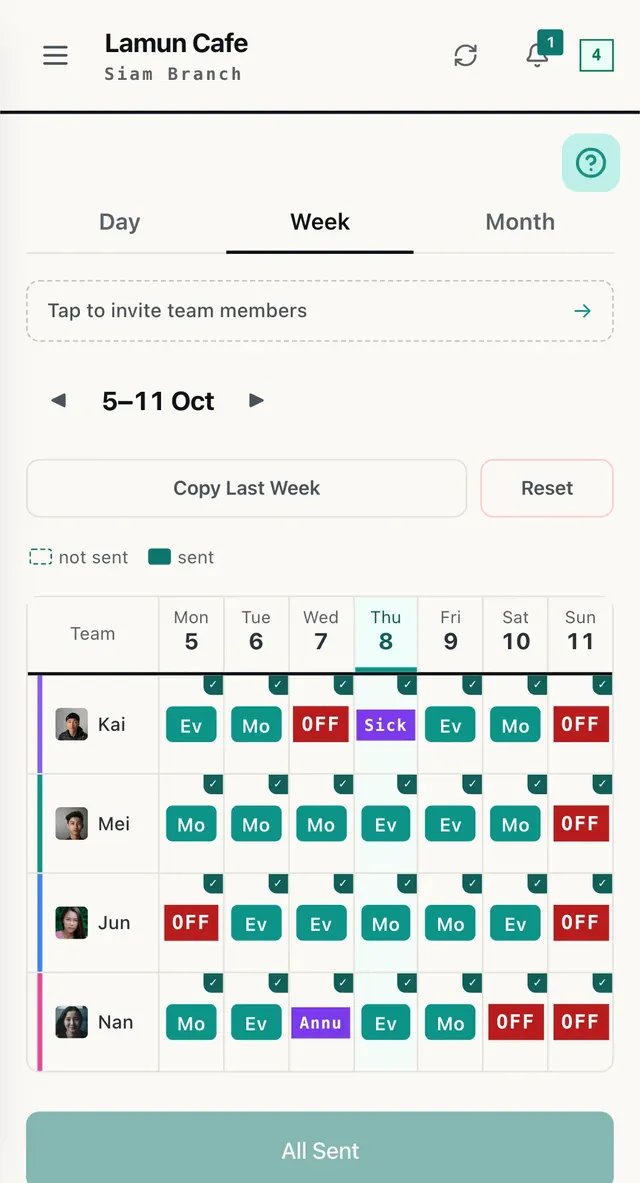
The roster is where every number after it comes from
A check in is measured against the shift each person was given, leave comes off their own balance, and payroll is calculated from the hours that actually happened, not the hours planned.
Questions people actually ask
What is the best scheduling app for a supermarket or a retail chain?
Does it work for a restaurant chain where the kitchen and the floor run different shifts?
Can a clinic or hospital use it for rotas?
We use Excel today. What does moving actually involve?
Will staff who are not comfortable with technology manage it?
Let us set it up to fit your business.
Add us on LINE and talk to a real person. One 45 minute call: we prefill the roster, you press Send. After it, the whole system fits your business, with every contract set.
Free forever for small teams. Bigger teams: 60 days free, every feature open, any number of staff, no card needed. They start after your free setup call, or the next day if you set up yourself.
Bigger teams: after 60 days you pay a monthly price per store, based on the features you keep. Message us on LINE and we will send you your price.