Attendance, leave and payroll, inside the LINE your team already uses.
The roster is where every number comes from: who was late, who took leave, who worked overtime, and what everyone is owed. This page is about those three jobs.

Four systems that used to be separate, on one set of data
Usually the roster is in a LINE group, the scanner is by the door, leave is on paper and payroll is in Excel. In WorkCo the shift you assign is the reference: check in, leave and payroll all follow from it, with nothing retyped.
- GPS check in and out from each person's own phone, with a radius you set per branch
- A Late stamp beside the name on the day's roster, and an evening preview of tomorrow's shift
- Leave requested and approved in LINE, with the balance shown by type
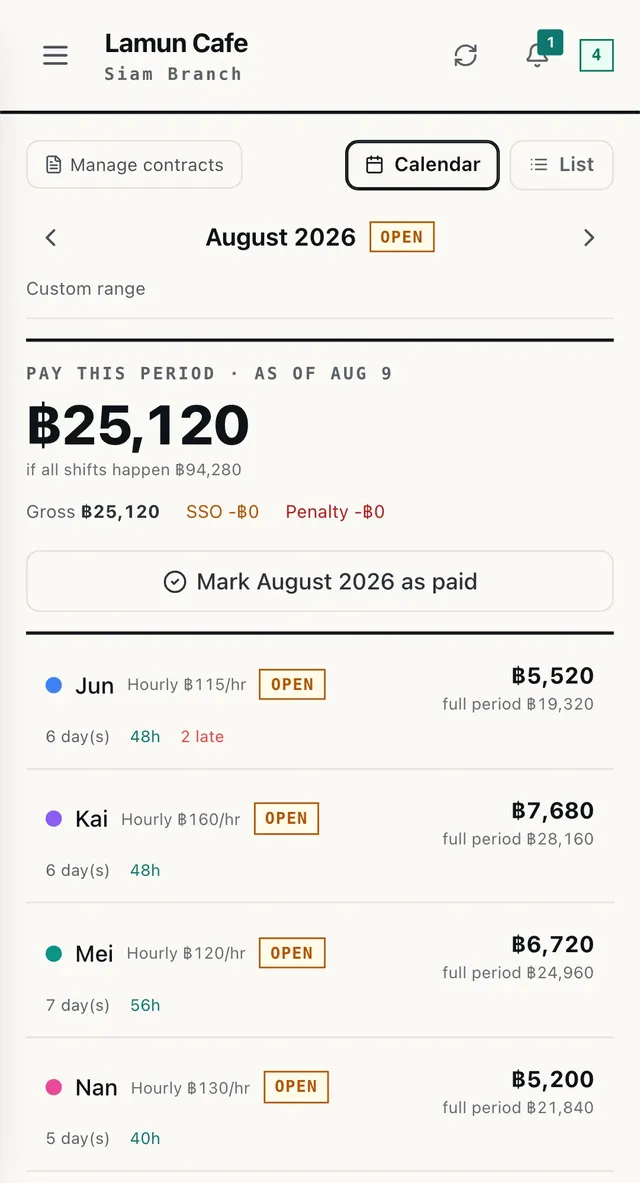
- Payroll from the hours actually worked, with payslips and hourly, daily or monthly contracts
- Hours and overtime reports, exportable
Nothing to break, and no second system to look after
A scanner by the door is a second system to look after. The day it fails nobody can clock in, you wait days for a technician, and that month is rebuilt by hand. WorkCo uses the phone each person already carries: one broken phone is one person, not the whole shop.
- Nothing to buy, nothing to mount, no cabling
- No single point that stops the whole shop clocking in
- A new branch is live at once, with no wait for equipment
- No biometric data stored. It uses GPS inside a radius you set
- Managers can open it in any browser on a computer, signing in with LINE Login
Built around the law of the country you actually operate in
Thai social security and overtime are built in, not left as a field for you to fill. Taiwanese accounts run on Taiwanese rules: 特休 (annual leave by length of service), 加班費 (overtime rates) and 勞健保 (labour and health insurance). A system built elsewhere usually lacks this, simply because it was not built for the rules here.
How many people, and how many branches
- Free forever for small teams. Bigger teams: free for 60 days, every feature, no card.
- Bigger teams: after 60 days you pay a monthly price per store, based on the features you keep. Message us on LINE and we will send you your price.
Our largest customer runs 30+ locations and more than 150 staff on one system.
What WorkCo does not do
If you want a full HR suite for office staff, WorkCo is not it. We are built for shift teams.
- No recruitment or applicant tracking
- No performance reviews or goal tracking
- No training courses or e-learning
- No document e-signing and no org chart
- Not connected directly to accounting software yet. Today you export a file
Questions people actually ask
Does WorkCo actually run payroll, or just export hours?
Do employees have to install anything?
We already have a fingerprint scanner. What changes?
Does WorkCo work out labour and health insurance?
Does it work for daily and hourly staff?
Let us set it up to fit your business.
Add us on LINE and talk to a real person. One 45 minute call: we prefill the roster, you press Send. After it, the whole system fits your business, with every contract set.
Free forever for small teams. Bigger teams: 60 days free, every feature open, any number of staff, no card needed. They start after your free setup call, or the next day if you set up yourself.
Bigger teams: after 60 days you pay a monthly price per store, based on the features you keep. Message us on LINE and we will send you your price.