The Floor · Thailand
How-to · 2026
Onboard a New Employee in 5 Minutes on LINE (No App to Download)
Sunday night, you hire someone Monday morning. With most scheduling apps, that means asking your new hire to download a new app, create an account, get approved, and watch a tutorial. By the time they are ready, the morning rush is already over. With LINE, the whole onboarding takes about 5 minutes and the employee never installs anything new.
This guide walks through the exact 5-step flow that owners of more than 40 Thai businesses (clinics, cafes, restaurants, cleaning teams, security firms) use today to onboard new staff via WorkCo, the LINE mini app for shift scheduling.
Why traditional employee onboarding fails for Thai SMBs
Most workforce-management apps come from Western markets and assume your team is ready to install one more SaaS tool. In reality, asking a Thai shift worker to download a new app creates three problems at once:
- Storage friction. Many older Android phones are full. A 100MB scheduling app is the third or fourth thing they cannot install.
- Account fatigue. Another email, another password, another OTP. Each step costs you a percentage of new hires who never finish.
- Manager bottleneck. The owner has to walk every new hire through the install. That eats 15 to 30 minutes per person, every time.
A LINE-native scheduling tool sidesteps all three. Every Thai adult already has LINE installed (Thailand has 53 million monthly active LINE users as of 2026). LINE handles authentication. There is no install. The owner does nothing during onboarding except share a link.
The 5-minute flow, step by step
1. Open WorkCo, tap Invite Team
In your WorkCo LINE mini app, tap the Team tab, then tap Invite Team. WorkCo generates a 12-hour invite link automatically. No form to fill in, no role to set first.
2. Share the link in LINE
Tap Share via LINE. Pick the chat (or the team LINE group) where the new employee is. The invite lands as a tappable card with your business name on it.
3. Employee taps the invite
The card opens WorkCo inside their existing LINE app. Their name and profile photo auto-fill from their LINE account. They see your business name and a single Confirm button.
4. They tap Join, they are in
No manager approval step. The employee is added to your team the moment they confirm. You get a LINE notification telling you who just joined, with a one-tap link to set their schedule.
5. Their first shift lands in their LINE chat
When you assign them a shift and tap Send Schedule, a Flex message appears in their LINE chat with the WorkCo Official Account. Date, time, location, and a check-in button. They never have to open a separate app to see when they work.
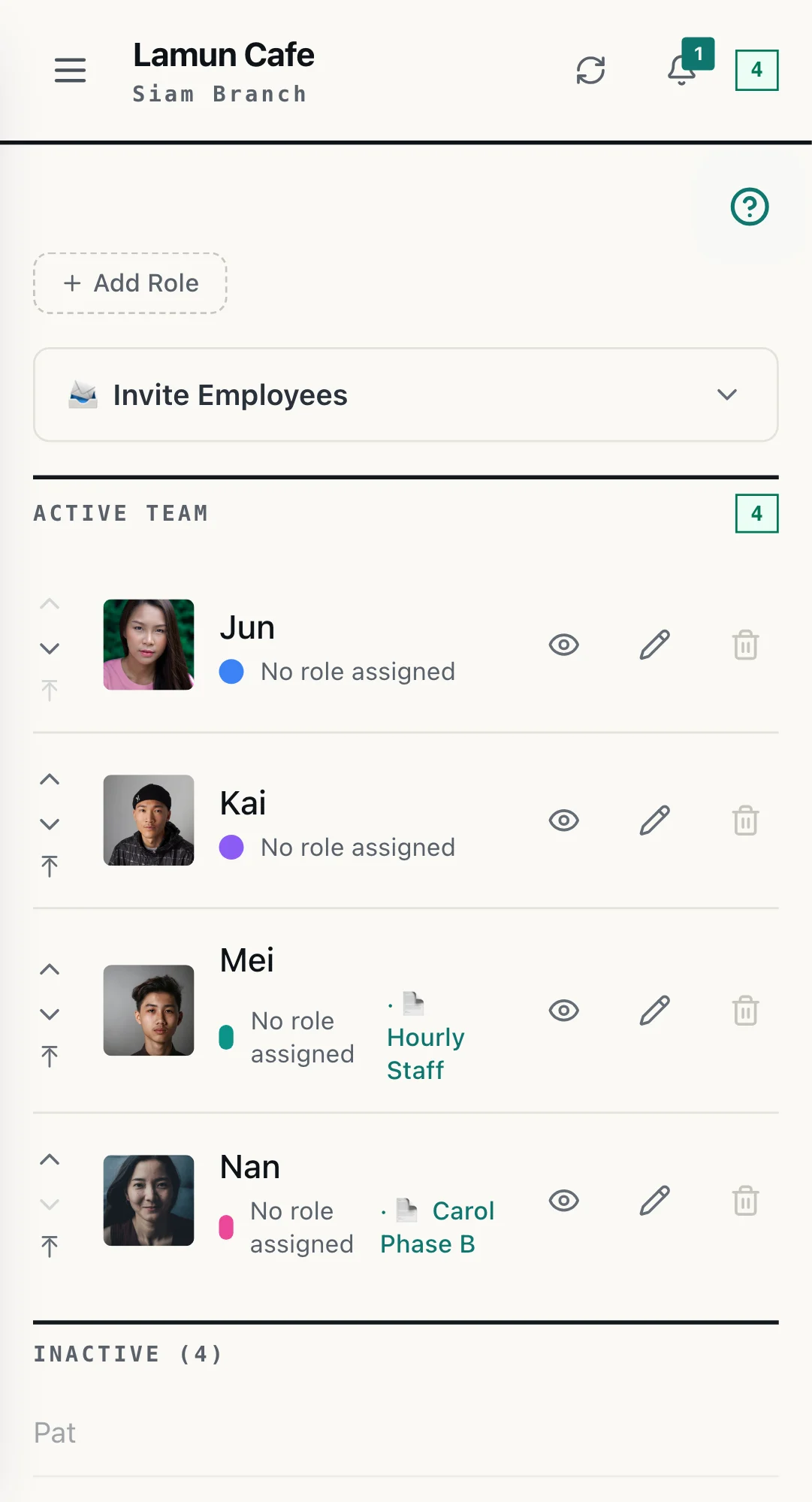
THE REAL SCREEN · TEAM
The owner taps invite, the new person taps the link, and the name appears in the team, ready to be given shifts.
Why this works in Thailand specifically
LINE penetration in Thailand is the highest of any messaging app in the world relative to population. As of 2026, LINE reports 53 million monthly active users in Thailand on a population of 70 million. That includes teenagers, retirees, motorbike taxi drivers, restaurant servers, hotel housekeepers, and security guards. If you employ Thai people, every one of them already uses LINE every day.
That changes the onboarding math. Instead of asking the employee to do something new, you are asking them to receive one more LINE message. The cognitive load is near zero. The completion rate (employees who actually finish joining) climbs from roughly 60 percent on app-download tools to over 95 percent on LINE-native ones.
3 pro tips from owners already doing this
- Share into the team LINE group, not 1-on-1. When you share into the team group, existing employees see who is joining. It feels welcoming and saves you from sending a separate "this is our new teammate" message.
- Set their role and branch the moment you get the join notification. The notification has a one-tap link to the new employee's profile. Set their role and which branch they belong to before they open WorkCo for the first time, so their first view is already correct.
- If the link expires, the employee can request a fresh one. Each link is valid for 12 hours. If your new hire taps it after expiry, they see a "Request Fresh Invite" button. The owner gets a LINE notification with a one-tap re-share, and the requester is throttled to one per hour to prevent spam.
Frequently asked questions
Does my new employee need to download an app?
No. WorkCo runs entirely inside LINE as a LINE mini app. If your employee already has LINE installed (over 53 million Thai people do), they can join your team without downloading anything else.
How long does the invite link stay valid?
Each invite link is valid for 12 hours. If it expires before the employee taps it, they can request a fresh one and the owner gets a one-tap re-share notification.
Do I need to approve each new employee?
No. As of April 2026, employees who tap a valid invite link are added to the team instantly. The owner gets a LINE notification when each new employee joins.
Will the employee need to create a WorkCo account?
No. WorkCo uses LINE Login. Their LINE identity is the account. Their name and profile photo auto-fill from LINE. No password, no email signup, no profile setup screen.
How does WorkCo deliver the schedule to a new employee?
WorkCo sends the schedule as a LINE Flex message directly to the employee's chat with the WorkCo Official Account. The message shows their shift date, time, location, and a check-in button. They never have to open a separate app to see when they work.
Is WorkCo free for new employees joining a team?
Free while you have up to 15 staff across the whole group, with scheduling, check-in and leave, and no card needed. Employees never pay anything. Payroll, Tasks and Break are on the paid plans. Past 15 staff, at five or more locations, or when you want those features, we get in touch and move you to a paid plan: ฿1,500 per location a month (NT$1,900 in Taiwan), each location including 15 staff. Nothing is switched off.
Ready to onboard your first employee? Add WorkCo on LINE, set up your business in 2 minutes, then share the invite link with your team. Free up to 15 staff, no card needed.