
WORKCO · SHIFT SCHEDULING THAT LIVES INSIDE LINE

FOR CHAINS WITH 10 OR MORE BRANCHES · TH + TW

Every branch. One system.

Today every branch schedules its own way. Some use Excel, some use a group chat, and at month end head office pieces the numbers together by hand. WorkCo puts every branch on one account, delivers each person's shifts into the LINE they already use, and gives head office one attendance report across the chain. No new app, no training. We configure and roll it out with your team, branch by branch.

SETUP WAIVED · BILLING STARTS ONCE YOU ARE LIVE · LIVE IN THAILAND + TAIWAN

A head office meeting room with a long wooden table and the city through floor to ceiling glass
01 HEAD OFFICE

8 YEARS OF SCHEDULING SYSTEMS · LIVE IN THAILAND + TAIWAN · LARGEST CLIENT 30 BRANCHES

SEE IT WORK

Watch a whole chain run
on one set of numbers

FILM 68 SECOND EXPLAINER, FOR MULTI BRANCH

WHAT HEAD OFFICE ALREADY KNOWS

Every HR number
is born in the schedule

Attendance is a scheduled shift that was kept. Leave is a shift removed. Overtime is the hours beyond the shift. Payroll is shifts times rate. While the schedule lives in each branch manager's spreadsheet, somebody at head office re-keys those numbers every month, and every re-key is a chance to be wrong.

A fingerprint scanner at the branch, a payroll program in accounting, a leave sheet with HR. Three systems doing one job, with a person moving data between them. The problem was never at the end of the chain. It is at the source, which has never been standardised across the branches.

Your payroll is just your schedule, counted. Don't fix the outputs. Fix the source they are all born from.

THE HIDDEN COST

One job,
done twice

Scheduling quietly drains two teams at once, the branch managers on the floor and the office team at head office, and the same numbers get passed back and forth between them every month. This is the cost that never appears on an invoice, but you pay it every month.

At the branch
The branch managers
  • Rebuild the roster from scratch every week, branch by branch
  • Chase the group chat all day: swaps, last-minute leave, no-shows
  • Re-send a screenshot every time the schedule changes
  • Tally each person's hours and overtime by hand at month end
At head office
HR and accounting
  • Chase every branch for its numbers at each month end
  • Merge dozens of different branch formats into one
  • Re-key the data into the payroll program, branch by branch
  • Reconcile the numbers that do not match, and hope payroll is right

And between the two, the same numbers get typed twice, sent late, and trusted by neither side. Every re-key is a chance for payroll to be wrong.

120+ HRS / MO Ten branch managers at just 3 hours a week each is already over 120 hours a month on scheduling alone, before head office spends a single day consolidating and re-keying it all. Multiply that by your team's wage.
A desk with a laptop and a notebook by an arched window looking onto shophouses
02 HEAD OFFICE DECIDES ONLY AS WELL AS THE NUMBERS THE BRANCHES SEND

WHAT YOU GET

One standard, every branch

Every branch schedules the same way, each with its own shifts and settings. Managers switch between branches in one tap, and the attendance report can be run across all branches at once.

01

Every branch,
one account

Each branch keeps its own shifts, staff and GPS settings. Owners and managers switch between them in one tap, without logging in again.

  • One tap copies last week, then you edit only what changed
  • Add as many branches as you need
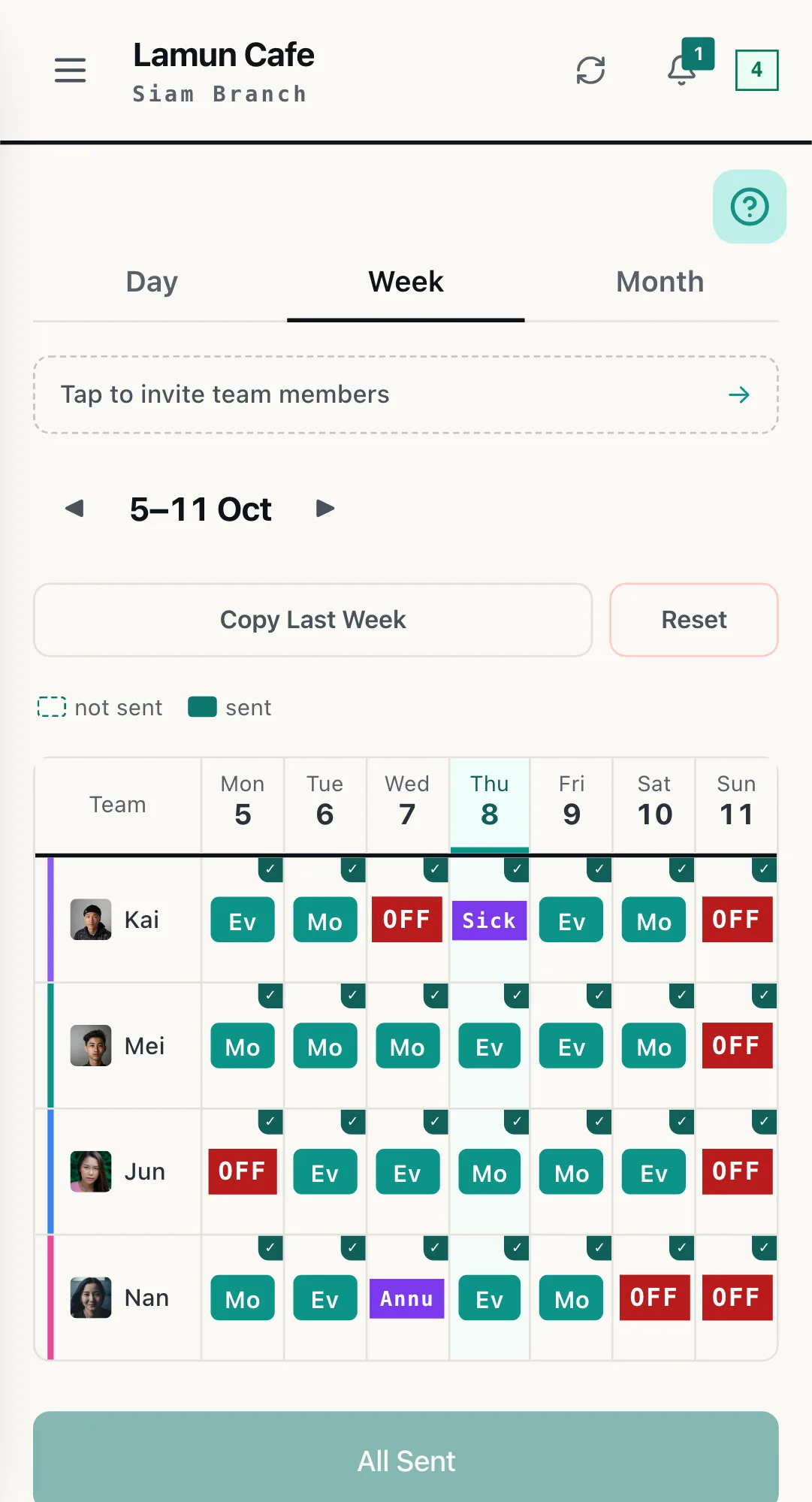
WorkCo weekly branch roster: a row per person, Monday to Sunday, with shifts, days off and leave
03 A BRANCH WEEK
02

Attendance,
across all branches

Choose "all branches" to see attendance, lateness and hours for the whole chain in one view, and export it for your accounting team.

  • Exports to CSV and PDF for accounting
  • If someone is late, you hear about it right away
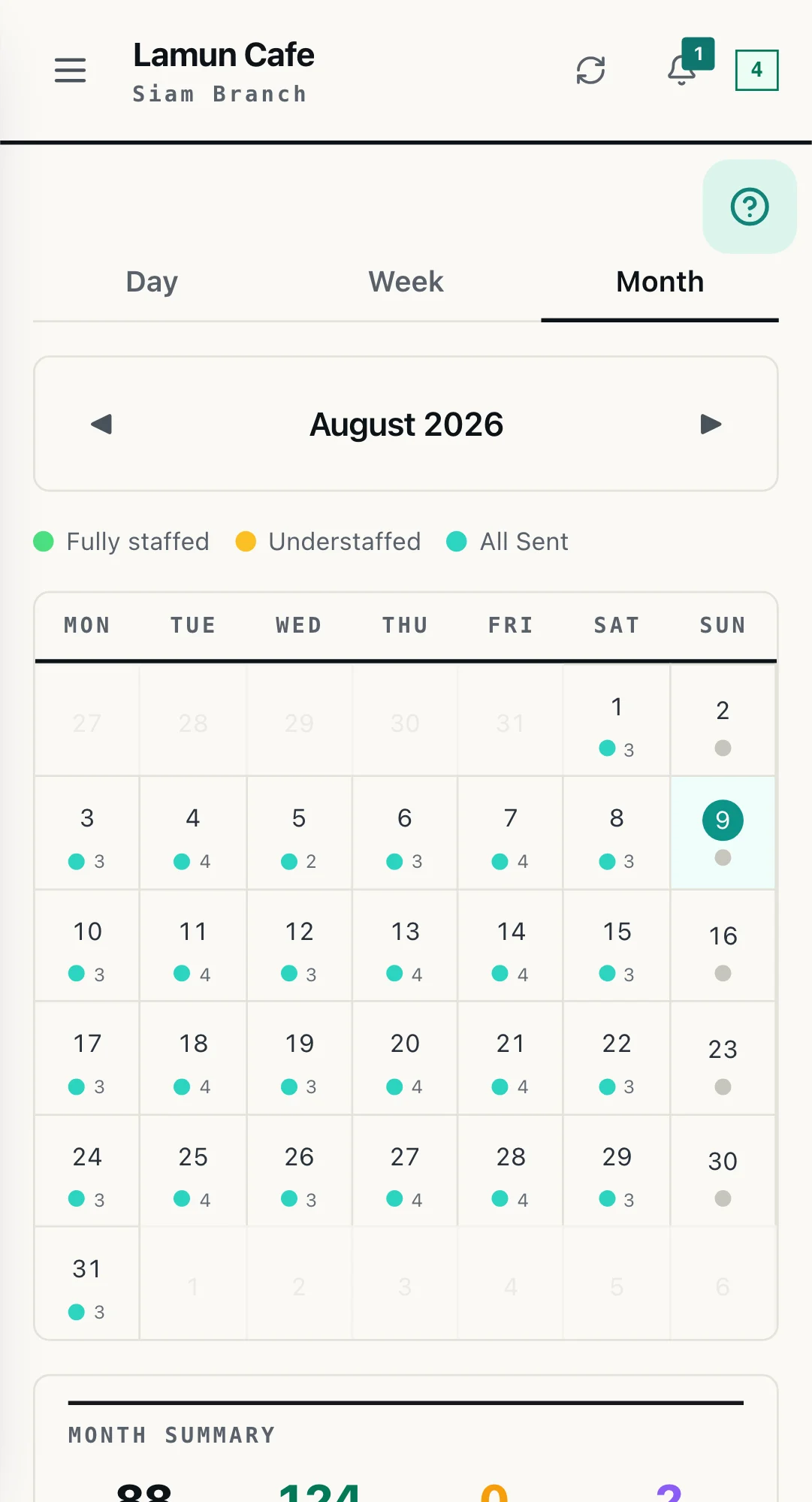
WorkCo month view of a branch, each day marked with the number of staff scheduled
04 THE MONTH, PER BRANCH
03

Permissions,
by role

A manager sees only the branches they run. The owner sees them all. You decide who can view reports and who can approve leave.

  • Each employee sees only their own shifts
  • Those boundaries are enforced at the database level, not just in the interface
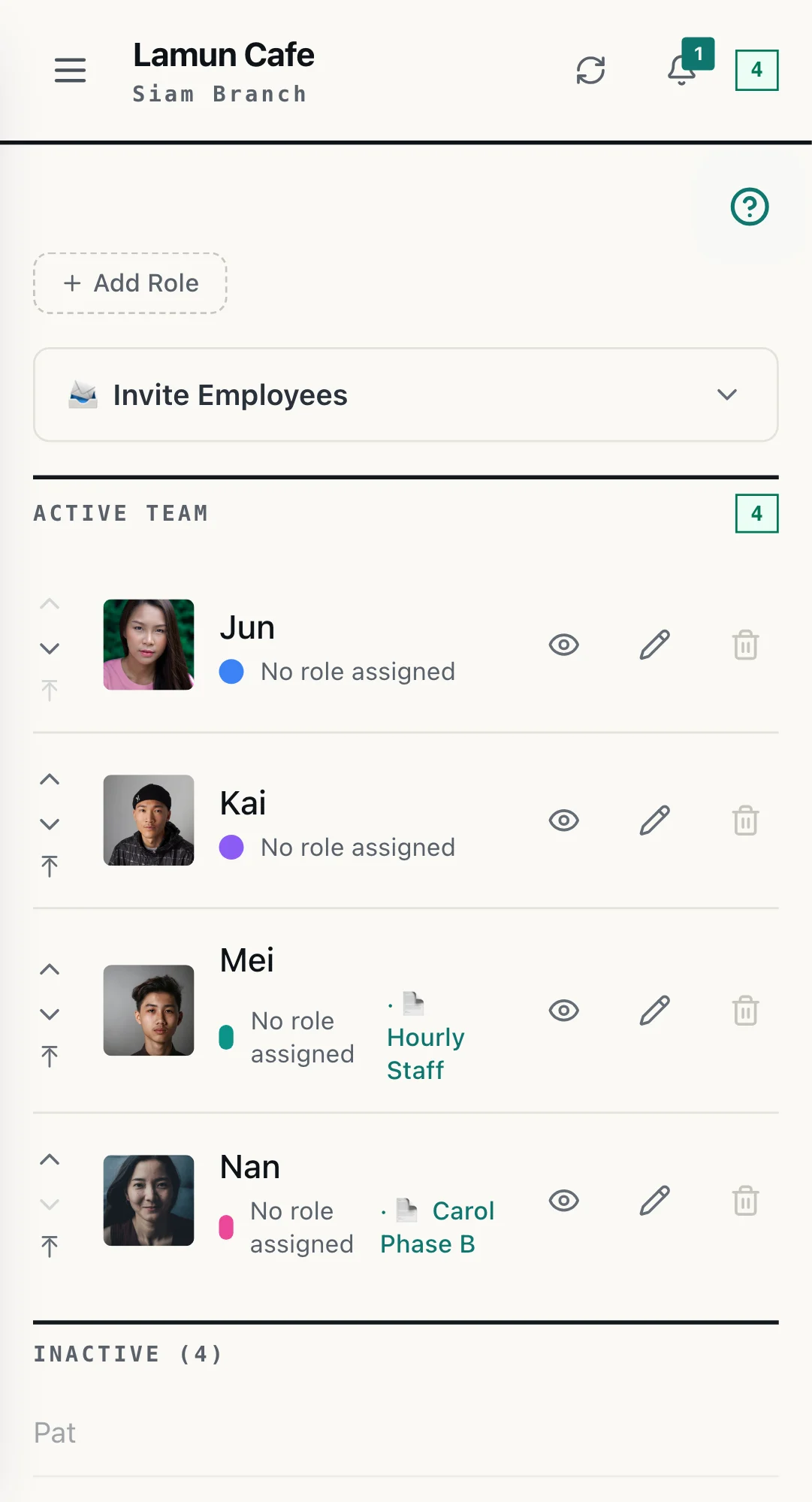
WorkCo team screen with the invite employees panel above the active staff list
05 TEAM AND ROLES
04

At head office,
on a full screen

Head office work does not happen on a phone. Open the same account on a computer at the office, build or check any branch's week on a full screen, and send it to LINE the same way. Everything syncs.

  • Copy last week and send the whole week from one screen
  • Switch to any branch you run in one tap
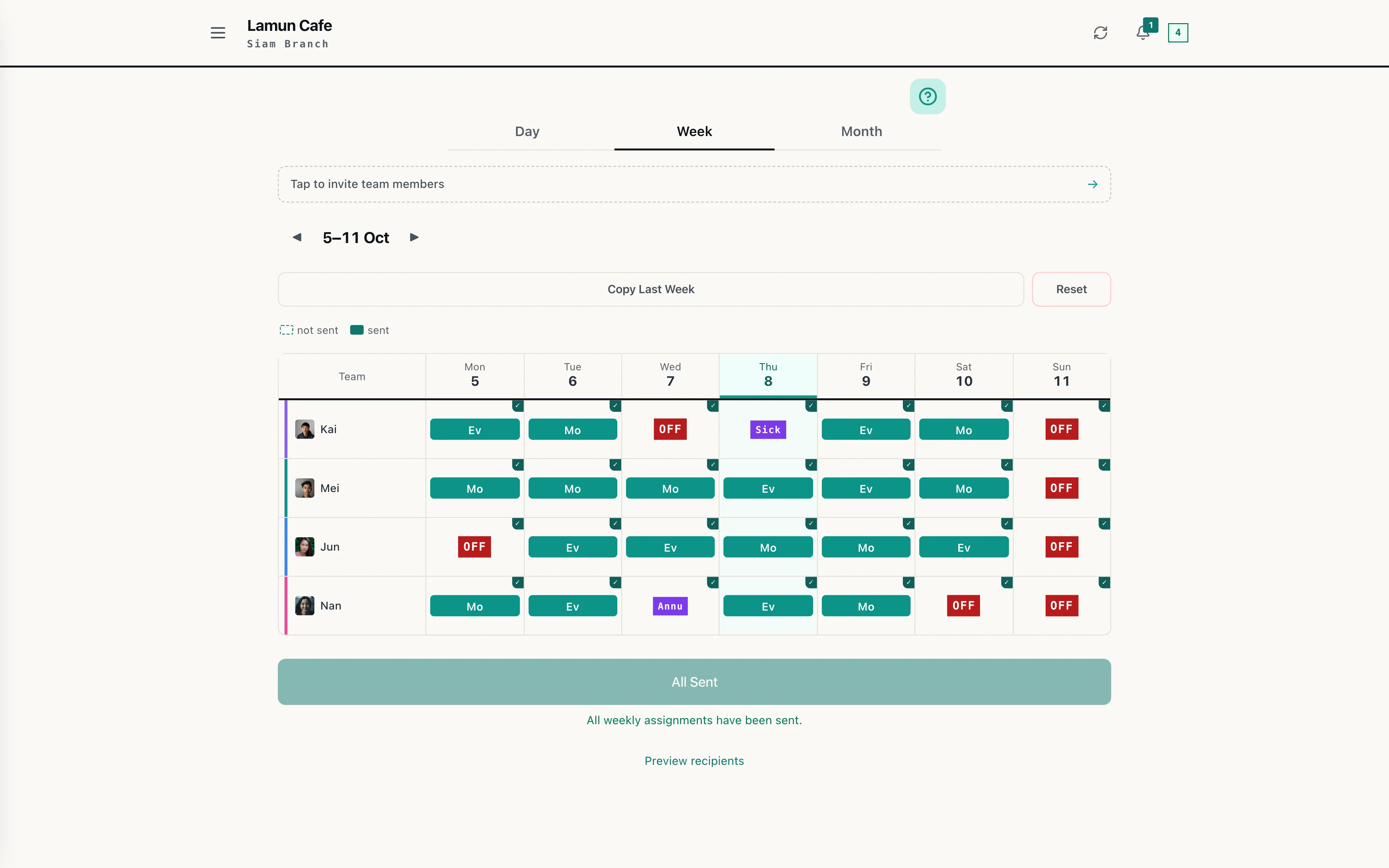
WorkCo on a computer, a branch week in the browser with an All Sent confirmation below it
06 ON THE OFFICE COMPUTER

AND THREE MORE THINGS THAT COME WITH THE SAME ACCOUNT

05

Nothing new for staff to learn

Schedules, reminders and leave requests all happen inside the LINE your staff already use every day. No new app, no new password.

06

GPS check-in, at the branch

Set a radius per branch. Staff check in when they are inside it. No punch-card hardware to buy for every location.

07

Payroll and OT from the shifts

Hours and overtime are calculated from the shifts that were actually sent. Reports export as CSV and PDF, per branch, following Thai labour law.

WHY THE LAST SYSTEM FAILED

Staff actually use it,
from day one

Most HR systems do not fail on features. They fail because frontline staff will not download the app, cannot remember the password, and quietly go back to the group chat.

  • No app to download, no new account. It runs inside the LINE they have.
  • One tap and every person in every branch has their own shifts in LINE.
  • Shift reminders and leave requests are approved inside LINE.
  • Branch managers do not change how they work. Only where the schedule lives.
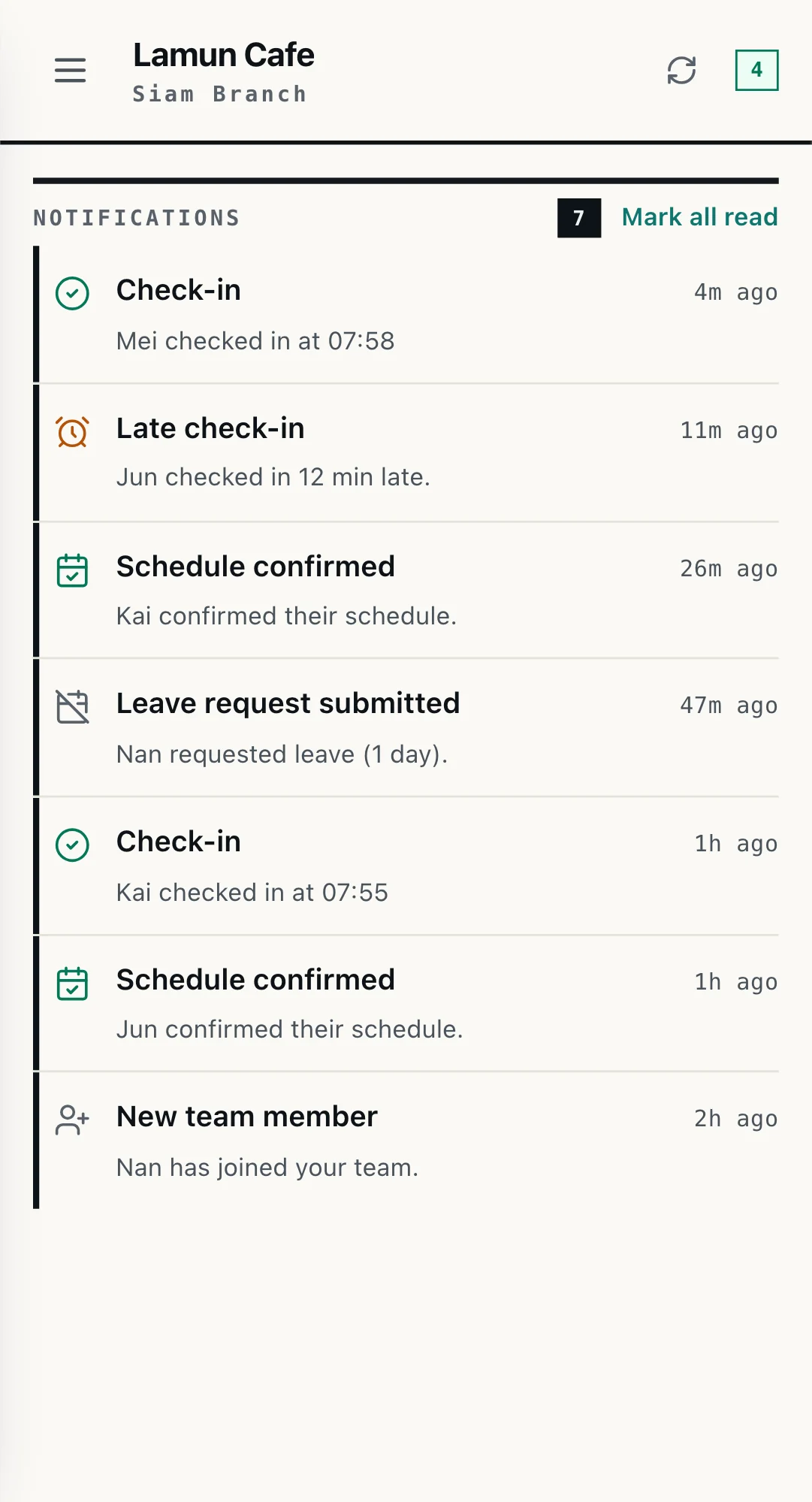
WorkCo notification list: check-ins, a late check-in, schedule confirmations and a leave request
07 WHAT STAFF RECEIVE IN LINE

UNDER YOUR NAME

Your staff see your company.
Not ours.

Your chain gets its own LINE Official Account, and everything happens inside it. Frontline staff, branch managers and the people at head office are all on that one account, each seeing a different menu according to their role. Picture an ordinary working day.

Frontline staff

Monday morning, they open LINE and there is a message from your company's account with today's shift. They arrive at the branch and check in from the menu at the bottom. They check out when they leave. If they need time off, they request it in the same place. All of it under your name.

Branch manager

The manager opens the same account, but their menu is different. They tap through to the app, build the branch's schedule, see who has arrived and who has not, approve the leave requests, and send next week's shifts to the whole branch.

Head office

HR and operations sit on that same account. They switch between branches, pull the attendance report across the whole chain and export it for accounting. There is no second system and no separate set of passwords. Everyone in the company is in one place.

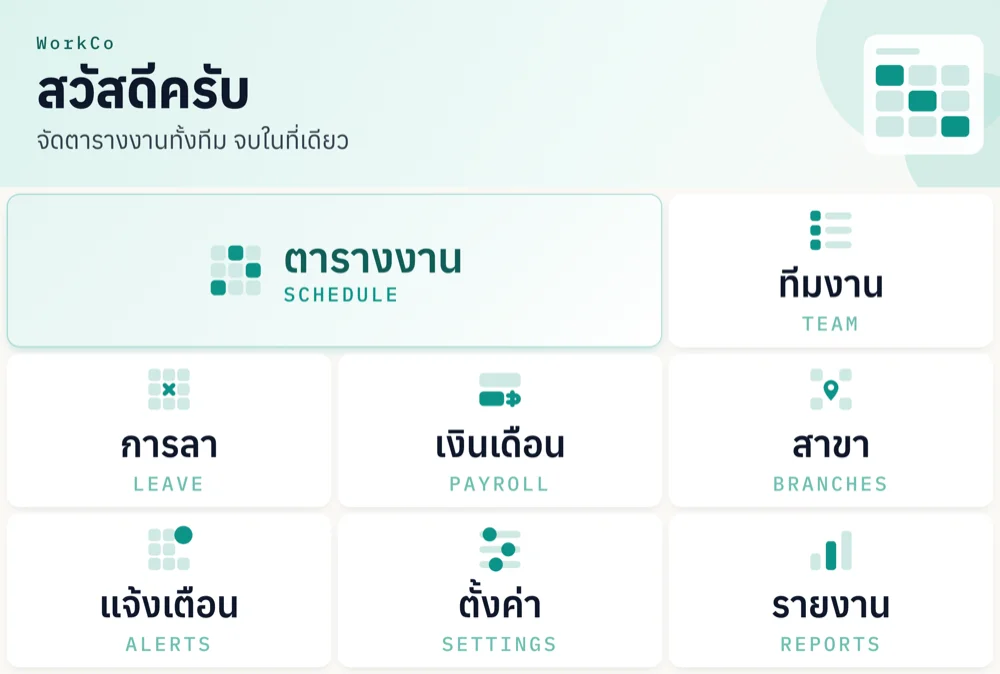
The WorkCo LINE menu for owners and managers: schedule, team, payroll, leave, notifications and reports
08 OWNER AND MANAGER MENU
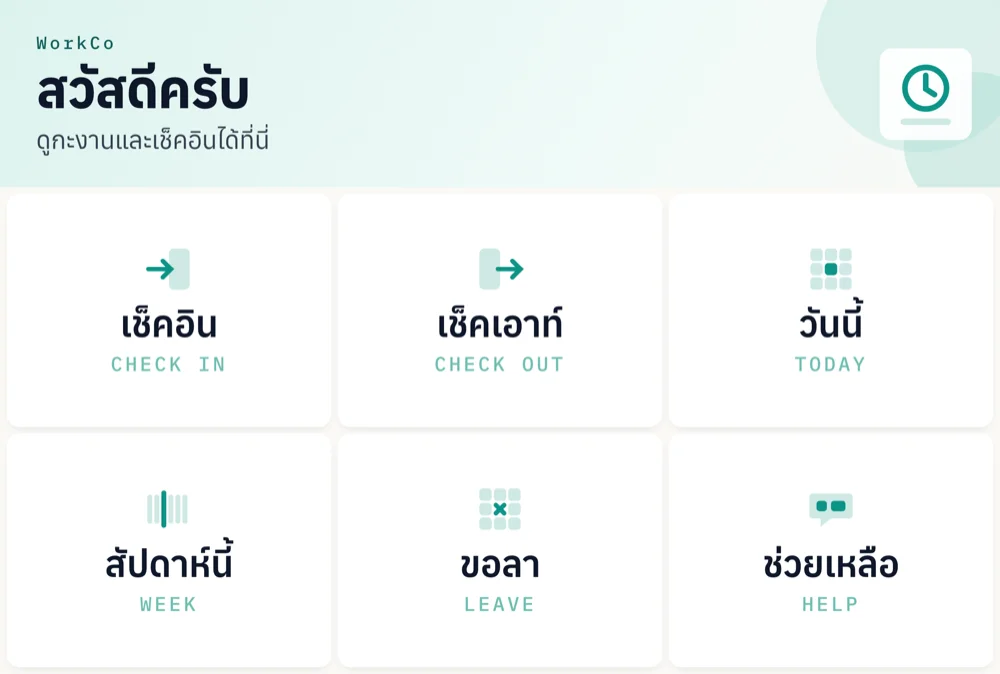
The WorkCo LINE menu for staff: today, check in, check out, this week and leave
09 EMPLOYEE MENU

Staff add your company's account as a friend, not WorkCo's. Every notification arrives from your name. We run the system underneath it without appearing.

ROLLOUT

Two steps,
then live the same day

Most HR systems take months, because they have to teach staff to download an app and remember a password. WorkCo skips that entirely. We scope it with you, configure it to how you actually run, then invite your team. Staff get their shifts in LINE right away, with nothing to learn.

Step 1

Scope it together

We sit with your HR and operations people, see how each branch schedules today, how many shift patterns exist and who approves leave, then configure the shifts, branches, GPS radiuses and manager permissions to match how you actually run. You never bend around the software.

Step 2

Invite the team, and go

Managers invite their staff through LINE. No app to download, no usernames or passwords, no employee training. Every guide is built into the app in each person's own language. Most new managers send their first weekly schedule the same day.

Same day

Most new managers send their first weekly schedule on the day they start. No training to wait for, nothing left to set up.

DATA & COMPLIANCE

The questions your legal team will ask

Who is the data controller

Your employee data belongs to your business. The business owner is the data controller for their own staff, and WorkCo is the processor, acting only on your instructions. We do not use your staff data for anything else. WorkCo complies with Thailand’s Personal Data Protection Act (PDPA). The detail is in our privacy policy and terms, and a data processing agreement is available on request from the security page.

How the data is held

Data is encrypted in transit and at rest. Each employee sees only their own shifts, each manager only the branches they run. Those boundaries are enforced at the database level, not just in the interface.

If you leave, whose data is it

It is yours. Export schedules, attendance and payroll reports to CSV and PDF at any time, without asking us first.

Who answers when something breaks

Message our team in LINE. The person who answers is on the team that built and configured your system, not a call centre reading a script.

COMMERCIALS

Priced per branch.
No setup fee.

The terms

Fee
Monthly, by branch count and team size
Setup and configuration
No setup fee
Term
12 months
Billing starts
Once the system is live

We build and configure the system first, with no setup fee, and you begin paying monthly once it is live. Everything sits in a signed agreement before work starts. This is a paid engagement, not the free plan, and separate from the free plan for businesses up to 20 employees.

Why waive it? Because we want the first chains on WorkCo to genuinely succeed. So we put the setup work in ourselves, and in return we ask permission to tell your story.

  • Your logo on our website
  • A short review, once it is actually working for you

FAQ

Questions that come up before a decision

Can head office see every branch in one view?
The attendance report has an "all branches" option, so you can see attendance and hours for the whole chain in one view. The schedule and payroll screens are still per branch, switched in one tap. If you need more of a roll-up than that, tell us when we talk. We build this alongside the chains that use it.
Is the LINE account really ours?
Yes. It is your company's own LINE Official Account. Staff add your name as a friend, and every message arrives from your name. If you already have an account we can use it. If not, we set one up during rollout. WorkCo runs underneath, where your staff never have to see us.
Do employees need to install an app?
No. WorkCo runs inside LINE. If they have LINE, they are ready. No new account, no password to remember. That is the reason adoption holds up in the first week instead of collapsing.
How many branches can it handle?
Add as many as you need, each with its own shifts and GPS settings. Our largest client today runs 30 locations and more than 150 staff on a single system.
Does it connect to our existing payroll software?
Today WorkCo calculates hours and overtime and exports CSV and PDF for your accounting team to use. If you need a direct connection, tell us which system and what data needs to move, and we will tell you honestly what is possible.
How fast can we be live?
Faster than most expect. There is no month long project, because there is no step where staff have to download an app or remember a password. We scope it with you, configure it to how each branch actually runs, and managers invite their team through LINE. Most new managers send their first weekly schedule the same day, then you open the remaining branches at your own pace. For a larger chain or an unusual setup, we will give you a real timeline when we talk, not an optimistic one.
How is this different from a full HR suite?
WorkCo does not try to be everything. It does one thing, the schedule, and lets the rest fall out of it. Large HR suites usually start at the outputs and still need someone to key the data back in, while the frontline staff never really use them.

TALK TO US

Tell us about your chain

Fill in this short form and we will get back to you as soon as we can. Nothing is decided at this stage.

  • The person who replies is on the team that would set it up
  • If WorkCo is not the right fit for you yet, we will say so
  • Your details are used only to reply about this enquiry
01 CHAIN ENQUIRY · ABOUT A MINUTE TO FILL IN

We use these details only to reply about this enquiry. We do not pass them on.