The Floor · Thailand
Multi-branch · 2026
How Thai chains run their entire HR on LINE
53 million Thais live their day on LINE, and your staff are already in there. This piece walks through how Thai chains run scheduling, GPS check-in, leave and payroll-ready hours entirely inside LINE, with no separate app and no training.
1. Your staff are already on LINE
LINE is where 53 million Thais live their day. It is the first thing your staff open in the morning and the last thing they check at night. Your kitchen team, your cashiers, your branch managers are all in there already, every shift, every day.
Yet most HR tools fight this reality. They ask your staff to download a separate app, create a new account, and learn a new screen before they can even see their shift. That single request is the adoption problem. The app that nobody opens cannot run your roster.
2. Why separate HR apps fail in Thailand
On paper, a dedicated HR app sounds professional. In a Thai chain, it quietly dies for very practical reasons:
- Download friction: Every new install is a step where staff drop off, especially part-timers and new hires who come and go.
- Low adoption: If only half the team installs it, you end up running two systems at once, the app and LINE.
- Training overhead: Someone has to teach every branch how to use it, then re-teach each new face.
- Staff ignore it: A new icon on the home screen gets opened on payday and forgotten the rest of the month. LINE gets checked all day.
The lesson is simple. You do not win adoption by asking people to change their habit. You win it by meeting them inside the habit they already have.
3. What "HR on LINE" actually means for a chain
"HR on LINE" is not a chat group with a few stickers. It means the full set of HR jobs your chain runs every week, delivered inside LINE, with no separate app and no training:
- Scheduling: Build the roster once, send it, and every person sees their own shifts.
- GPS check-in: Staff check in for their shift with a location stamp, so you know they are at the right branch.
- Leave requests: A staff member asks for a day off right in chat.
- Payroll-ready hours: Worked hours add up automatically and export for payroll.
- Notifications: Every reminder and update arrives in LINE, where it actually gets read.
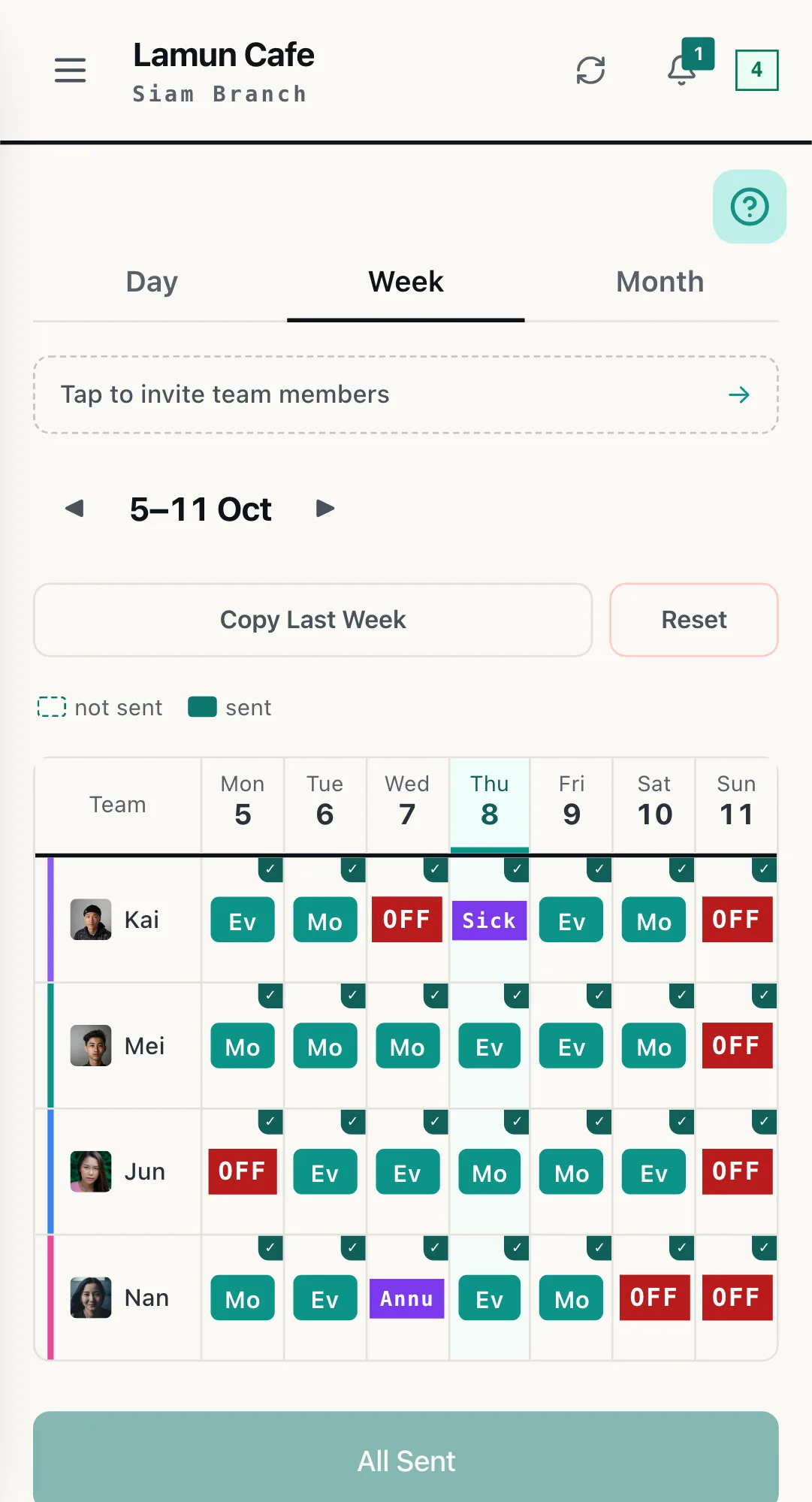
THE REAL SCREEN · SCHEDULE
Each branch has its own week. Tap a cell to assign, send once, and everyone sees their own week in LINE.
4. Built for the multi-branch chain
A single shop and a chain are different problems. Once you have several branches, you need to see the whole picture without losing local control. WorkCo gives you one central view across every branch, while each branch keeps its own manager and roles. Head office sees the chain, and the branch manager works only with their own team.
For a chain, the most powerful piece is a branded HR LINE Official Account. Instead of borrowing a generic channel, your staff get every schedule and update from the chain's own LINE Official Account, with your name and your logo. It feels like an in-house HR system, because it is one.
On any paid plan, WorkCo can run on that branded LINE Official Account for 15% off the WorkCo price. You pay LINE for its messaging plan directly, and setting it up carries a one-time fee, agreed with you after a short scope call. You do not get handed a login and left alone. We do the setup with you. From 10 locations it is the enterprise plan, priced case by case. To talk it through, use the lead form on our chain page.
5. How it works in practice
Here is one week, start to finish:
- You build the week's schedule. From one screen, set the roster for every branch, no jumping between shops.
- Tap send. One tap pushes the schedule out.
- Every employee gets their personal shifts in LINE. No group hunt, no scrolling. Each person sees only their own shifts.
- Staff check in by GPS. When the shift starts, they tap to check in with a location stamp.
- They request leave in chat. Need a day off? They ask right there in LINE.
- The manager approves in one tap. The branch manager sees the request and approves or declines instantly.
- Hours export for payroll. At the end of the cycle, worked hours are already totalled and ready to export.
Nobody downloaded an app. Nobody sat through a training session. The whole week ran inside the chat they were already in.
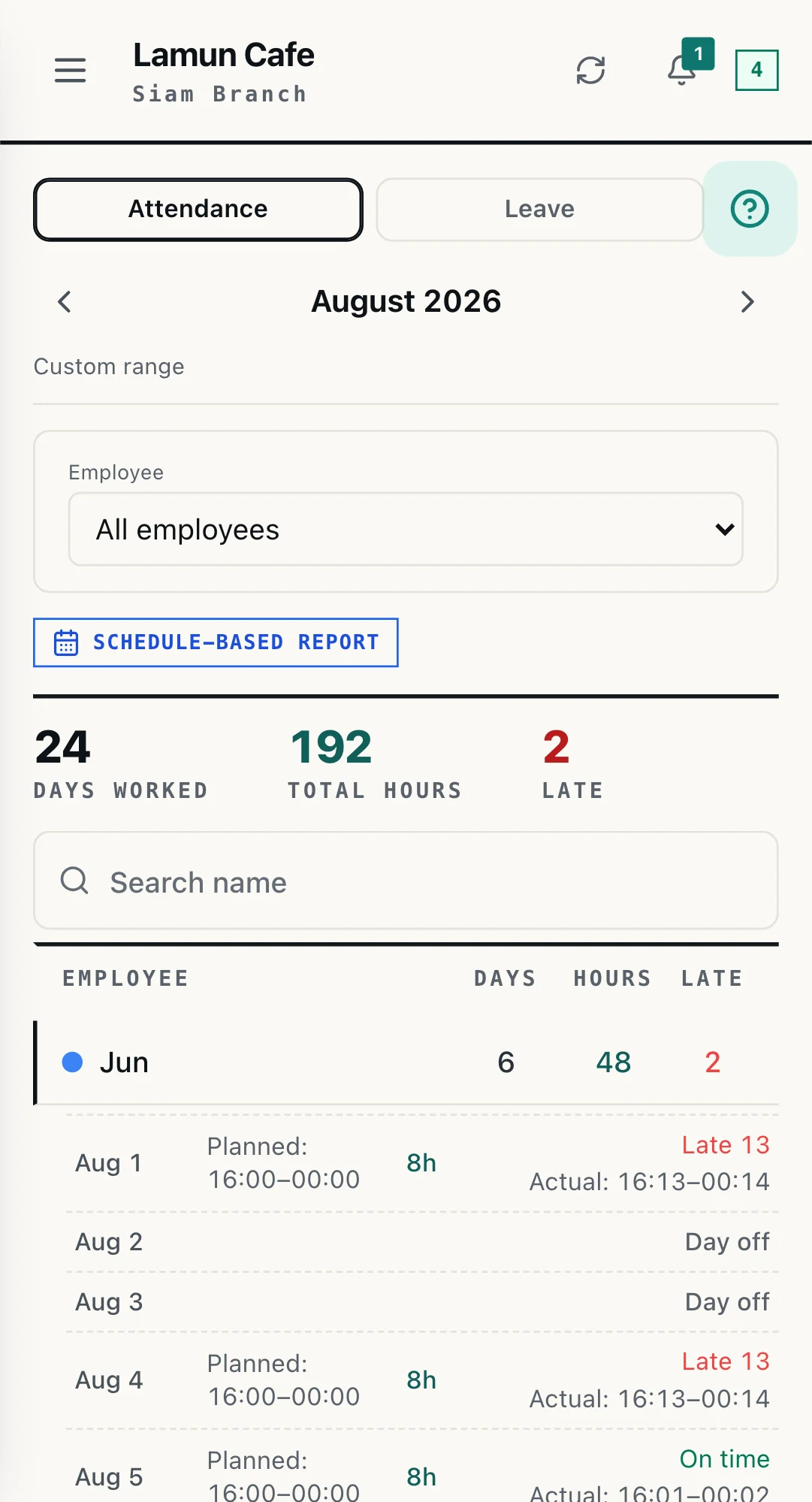
THE REAL SCREEN · ATTENDANCE
Days worked, total hours and late arrivals are counted from the real check-ins, so the office stops re-typing the month.
6. The payoff: real adoption, less admin
We will be honest with you. Running HR on LINE does not magically remove every problem. People still call in sick, and managers still make judgment calls. What it does remove is the friction layer that quietly breaks the other tools.
Because there is nothing to install, onboarding friction is near zero. Because the schedule lives where staff already look, adoption is real instead of theoretical. And because leave and hours are structured instead of scattered through chat, you spend far less time on admin and chasing.
Run your HR where your staff already are. That is the whole idea.
7. Frequently asked questions
Do staff need to download anything?
No. Everything runs inside LINE, which your staff already use every day. They receive their schedule, check in, request leave and get notifications in the same LINE app they check 20 times a day. There is no separate app to install and no new login to remember.
How does check-in work on LINE?
Staff open WorkCo inside LINE and tap to check in for their shift. The app records a GPS location stamp, so you can confirm the person checked in at the correct branch and not from somewhere else. There is no separate punch clock or hardware to buy.
Can it handle many branches?
Yes. You get one central view across every branch, with per-branch managers and roles. Head office sees the whole chain, while each branch manager works only with their own team. On any paid plan you can also move WorkCo onto your own branded LINE Official Account, for 15% off the WorkCo price, so every schedule and update reaches staff from your own channel.
Is our data safe under PDPA?
Yes. WorkCo is built for the Thai market and keeps a structured, time-stamped record of schedules, attendance and leave that you can export. That makes it far safer than tracking hours in disappearing LINE group chats or on paper, and it helps you meet the record-keeping duties under the Personal Data Protection Act (PDPA) and the Labor Protection Act.
How long does setup take?
Onboarding friction is near zero because there is nothing for staff to download or learn. An owner can build the first schedule and send it the same day. If you choose your own branded LINE Official Account, an option on any paid plan, we set it up together with you after a short scope call, so the rollout is handled with you, not dropped on you.
Ready to run your chain's HR on LINE? On any paid plan, WorkCo can run on your own branded LINE Official Account for 15% off, and we set it up with you. No downloads for your team.