The Floor · Taiwan
HOW-TO GUIDE
How a Taiwan chain runs its whole scheduling and leave flow on LINE
The short answer: move the whole loop into where your team already is, which is LINE. This guide walks through it step by step, from building the schedule, delivering it into LINE, staff seeing their own shifts in LINE, GPS check-in, requesting leave in LINE for a manager to approve, right through to exporting hours for payroll. It all happens inside LINE, so frontline staff download no new app and need almost no training.
1. Why being inside LINE changes everything for a chain
Frontline staff in Taiwan already live in LINE every day. The problem with most HR systems is not missing features, it is that staff will not download a new app or remember a new password. When they have to, real adoption usually breaks in the first week, especially in a chain with high turnover and a wide age range.
WorkCo is a LINE mini app, a small app that runs inside LINE itself. Staff open it from the LINE they already use, with no new app and no new password. That is why there is almost no training. Schedules are delivered straight into each person's LINE, and they open it to see their own shifts. For a multi-branch chain, this is the difference between everyone using it and only a few managers using it.
2. The whole loop at a glance
Before the detail, here is the whole path, all inside LINE:
- Build the schedule: the manager taps to assign each person a shift.
- Deliver into LINE: the schedule is sent into each employee's LINE.
- Staff see their shifts: they open LINE and see their own shifts.
- GPS check-in: at the start of the shift they clock in, confirming they are at the branch.
- Leave: staff request leave in LINE, the manager approves in LINE.
- Hours and payroll export: hours and overtime come out as a payroll-ready report.
3. Steps 1 to 3: build it, send it, and staff see it
On WorkCo's scheduling screen, the manager taps to set who works which shift on which day (tap-to-assign, one tap to assign). Once the week is filled, they send it, and the schedule goes into each employee's LINE separately. No printing, no pasting into a group, no emailing an Excel file.
On the staff side, they open LINE and see their own shifts clearly: which day, which time, which branch. Because it lives in the LINE they already check dozens of times a day, the chance of missing the schedule or not seeing a message drops sharply.
WorkCo works in Traditional Chinese, English and Thai, so if your chain has staff of different languages, each person sees the schedule in the language they are comfortable with.
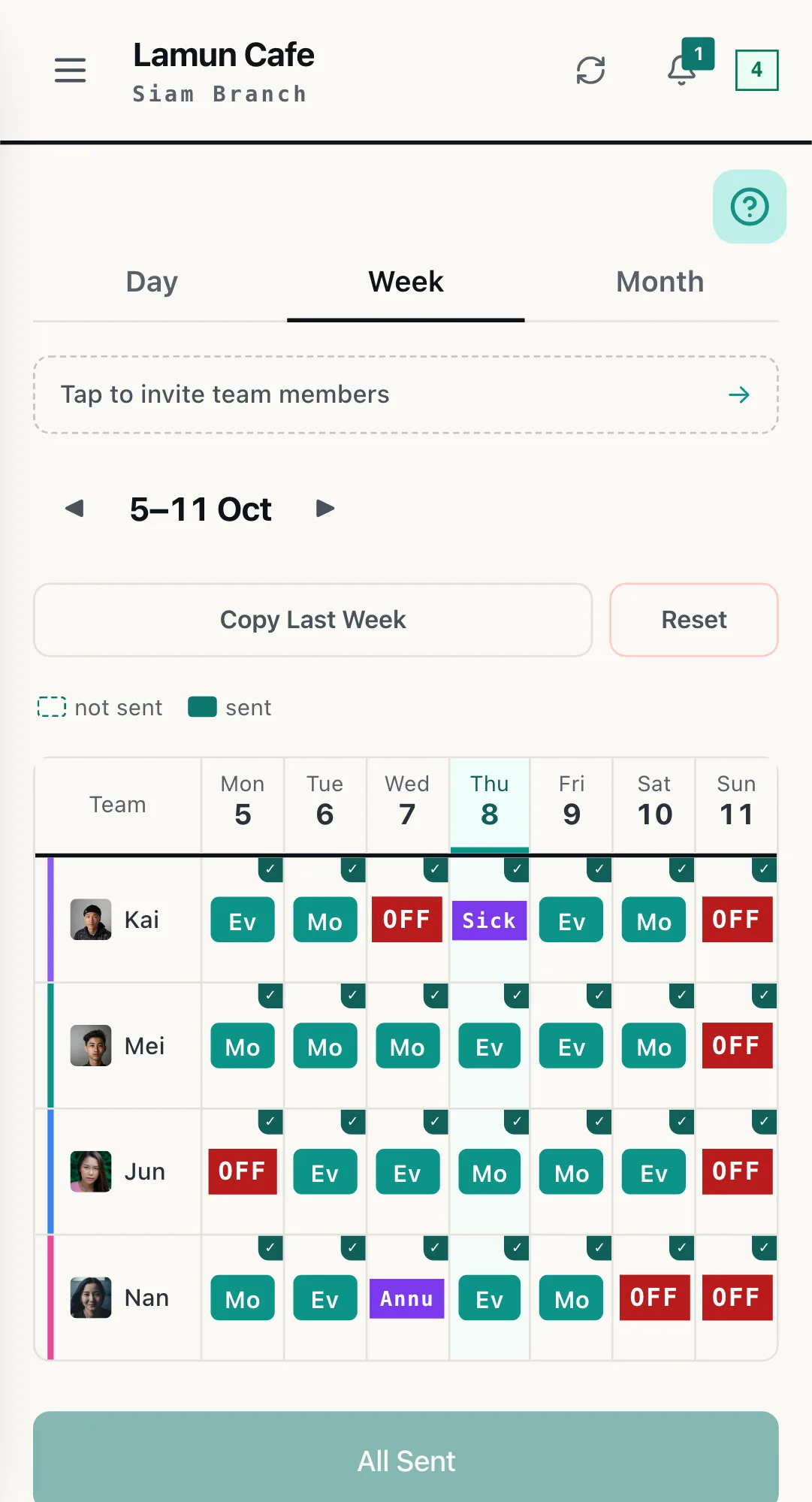
THE REAL SCREEN · SCHEDULE
The whole week in one grid. Tap a cell to assign a shift, then send once.
4. Step 4: GPS check-in
When the shift starts, staff tap to check in inside LINE, and the system uses GPS to confirm they are actually at the branch, not clocking in from home. For a multi-branch chain, this is the simplest way to know who has arrived and who has not, without a punch clock at every shopfront.
The real hours from check-in and check-out are recorded, and they become the basis for the hour report at the final step.
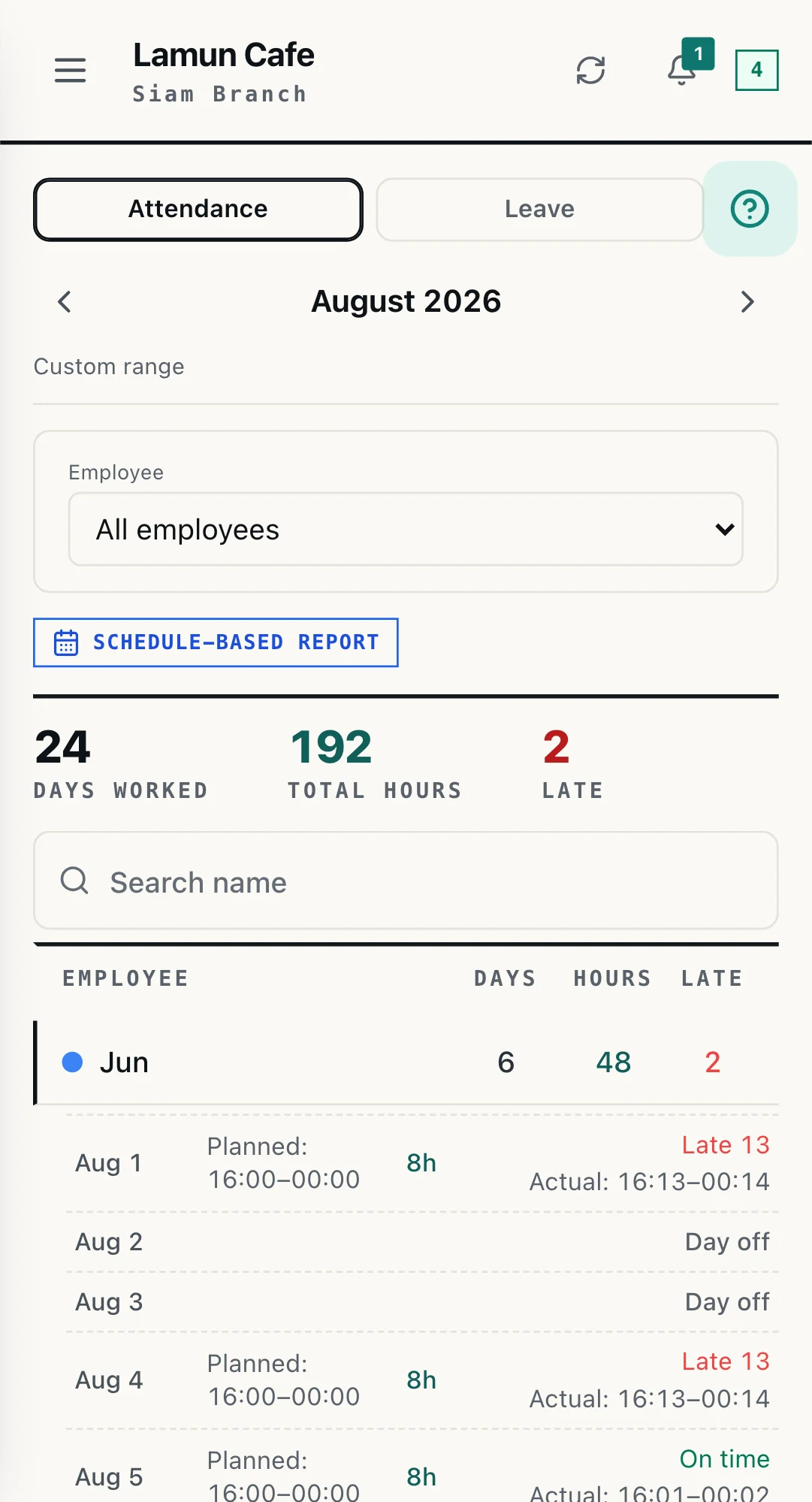
THE REAL SCREEN · ATTENDANCE
Days worked, total hours and late arrivals, counted from the real check-ins and ready to export.
5. Step 5: leave in LINE, approved in one place
This is where group chats usually fall apart. When staff ask for leave or swap shifts among themselves in a group, messages get buried, nobody clearly approves, and the real schedule never matches what was agreed.
In WorkCo, staff submit a leave request in LINE, the manager gets a notification and approves or declines in LINE too. Once approved, the schedule and the hours update to match automatically. Everything leaves a clear trail, with no scrolling back through a chat.
The best approval flow is the one where neither the employee nor the manager ever has to leave LINE.
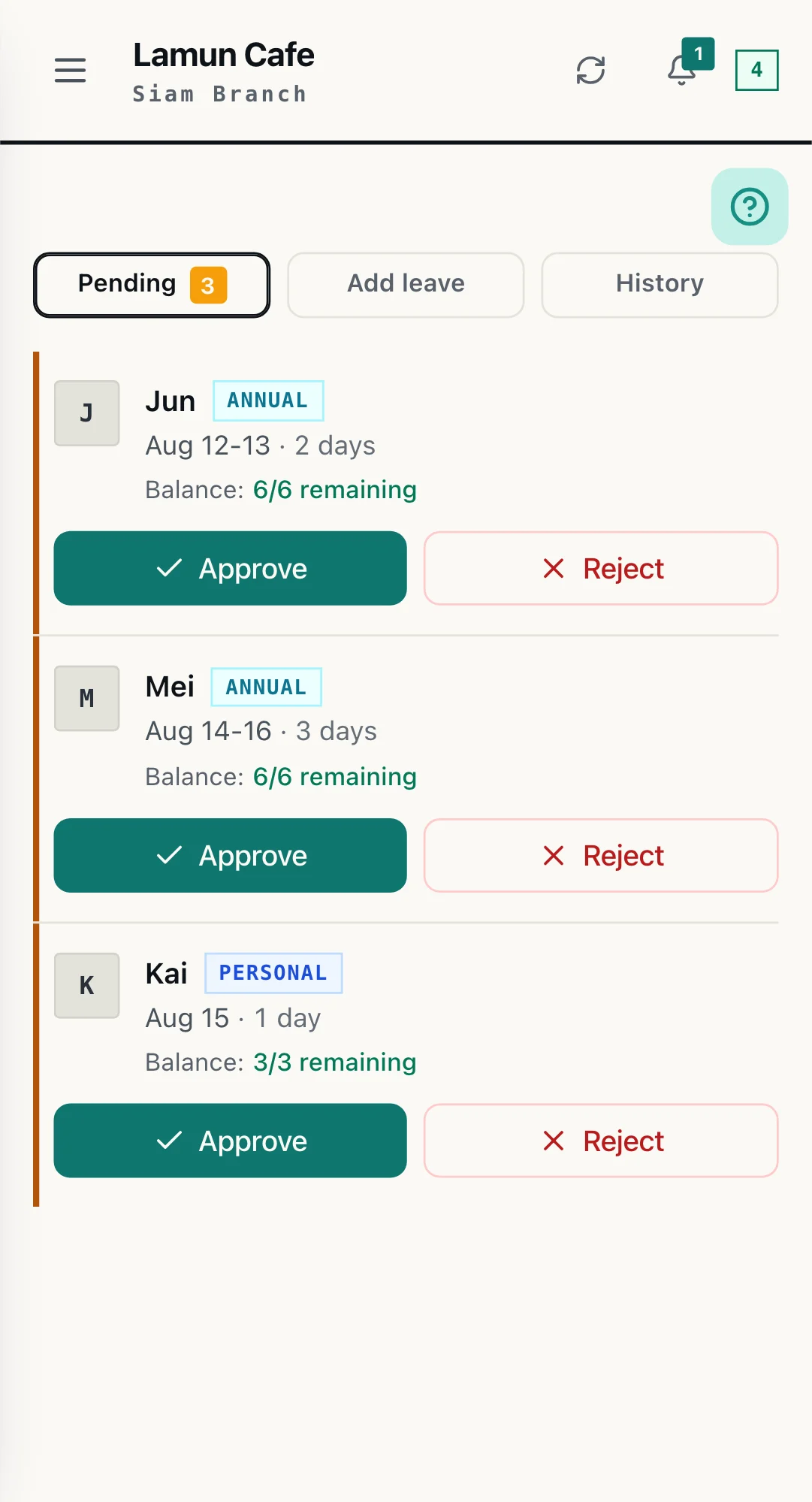
THE REAL SCREEN · LEAVE
Staff request leave in LINE, and the manager approves or rejects in one place, with the remaining balance shown alongside.
6. Step 6: export hours for payroll
At month end, the real hours from check-in and check-out, adjusted for approved leave, come out as a payroll-ready hour and overtime report. Accounting can run payroll straight from it, without manually merging numbers from each branch file by file.
Note: WorkCo makes gathering the hours far easier, but the final wage and overtime calculation should follow the Labour Standards Act and the authorities' announcements, and you should confirm your own case with a labour professional.
7. How a multi-branch chain runs it day to day
Each branch schedules and checks in on its own, but all the hours flow into the same system. A branch manager handles their own branch's shifts and leave approvals, while head office no longer has to wait until month end and merge Excel files in mismatched formats.
This works at real scale. Our largest client runs 30 locations and 150-plus staff on one WorkCo system. For chains of 10 or more locations, we help set it up chain-wide, so talk to us.
Frequently asked questions
Do staff need to download a new app?
No. WorkCo is a LINE mini app, a small app that runs inside LINE, so it opens right inside LINE. Staff still use the LINE they use every day, with no new app to download and no new account or password to remember. That is why frontline staff need almost no training. The schedule is delivered straight into each person's LINE, and they open it to see their own shifts.
How does a manager schedule a whole week on LINE?
The manager taps in WorkCo to assign each person a shift on each day (tap-to-assign, one tap to assign). Once the week is filled, they send it, and the schedule goes into each employee's LINE separately. The whole process happens in LINE, with no separate desktop system or second app to open.
How is leave handled in LINE?
Staff submit a leave request right in LINE, the manager gets a notification and approves or declines in LINE. Once approved, the schedule and hours update to match. No more relying on back-and-forth group messages, and nobody misses it.
Can a multi-branch chain use one system?
Yes. Each branch schedules and checks in on its own, but all the hours flow into one system, so head office does not have to merge mismatched Excel files at month end. Our largest client runs 30 locations and 150-plus staff on one WorkCo system. WorkCo is free in Taiwan while you have up to 15 employees across the whole group, covering scheduling, check-in and leave, with no credit card. Above that, or from five locations, it is NT$1,900 per location a month (฿1,500 in Thailand), each location including 15 staff, with every feature including payroll. From 10 locations it is the enterprise plan, priced case by case: talk to us.
Can hours be exported for payroll?
Yes. After staff check in with GPS, the real hours and overtime are recorded, and WorkCo produces a payroll-ready hour report so accounting can run payroll straight from it, without adding up each branch by hand. The final wage and overtime calculation should follow the Labour Standards Act and the authorities' announcements.
Move the whole loop into LINE
WorkCo is free in Taiwan up to 15 employees, so you start in LINE with scheduling, check-in and leave, no credit card. With 10 or more locations, talk to our team about rolling it out chain-wide.