COST · 2026
Free staff scheduling software: what free really costs a shift business (2026)
The short answer: yes, you can schedule staff for free, with a spreadsheet and a LINE group or with the free plan of an app. For one shop with a few staff on fixed shifts, that can be enough. As the team grows, the cost moves from the price tag to other places: the owner's hours, shift changes that do not reach people, pay worked out by hand, and the day you outgrow the free tool and move everything. Below is how to put a number on each one, and a checklist for comparing any option.
1. Three kinds of free
- A spreadsheet and a group chat. You build the week in Excel or Google Sheets, take a screenshot and post it in the team's LINE group.
- The free plan of a scheduling app. Most free plans stop at a number of staff or one location, or keep some features for paid plans. That is a fair way to try a product. Read where the limit is before you build on it.
- A free template or download. A ready-made roster sheet saves the first hour. Every week after that is still done by hand. Two free ones: a Thailand shift table and a Taiwan roster template.
None of these is wrong. The question is what each one costs you once the shop is busy.
2. Cost one: the owner's hours
A roster is not built once. It is built, sent, changed when someone is sick, changed again when two people swap, and checked against the hours at the end of the month. Count all of it, not only the first draft.
A worked example. Put in your own numbers.
| Hours a week: building, changes and checking | 3 hours |
|---|---|
| What one hour of your time is worth | ฿300 |
| One year (52 weeks) | 156 hours = ฿46,800 |
That number is the real price of free. Compare any paid tool to it, not to zero.
3. Cost two: changes that do not reach people
In a group chat the roster is one message among many. A change posted on Tuesday night sits under stickers and other talk by Wednesday morning. Someone comes in on the old shift, or does not come in at all, and the shop runs one person short at the busy hour.
What to look for: each person gets their own shifts, and a change reaches only the people it affects, with a clear note of what changed.
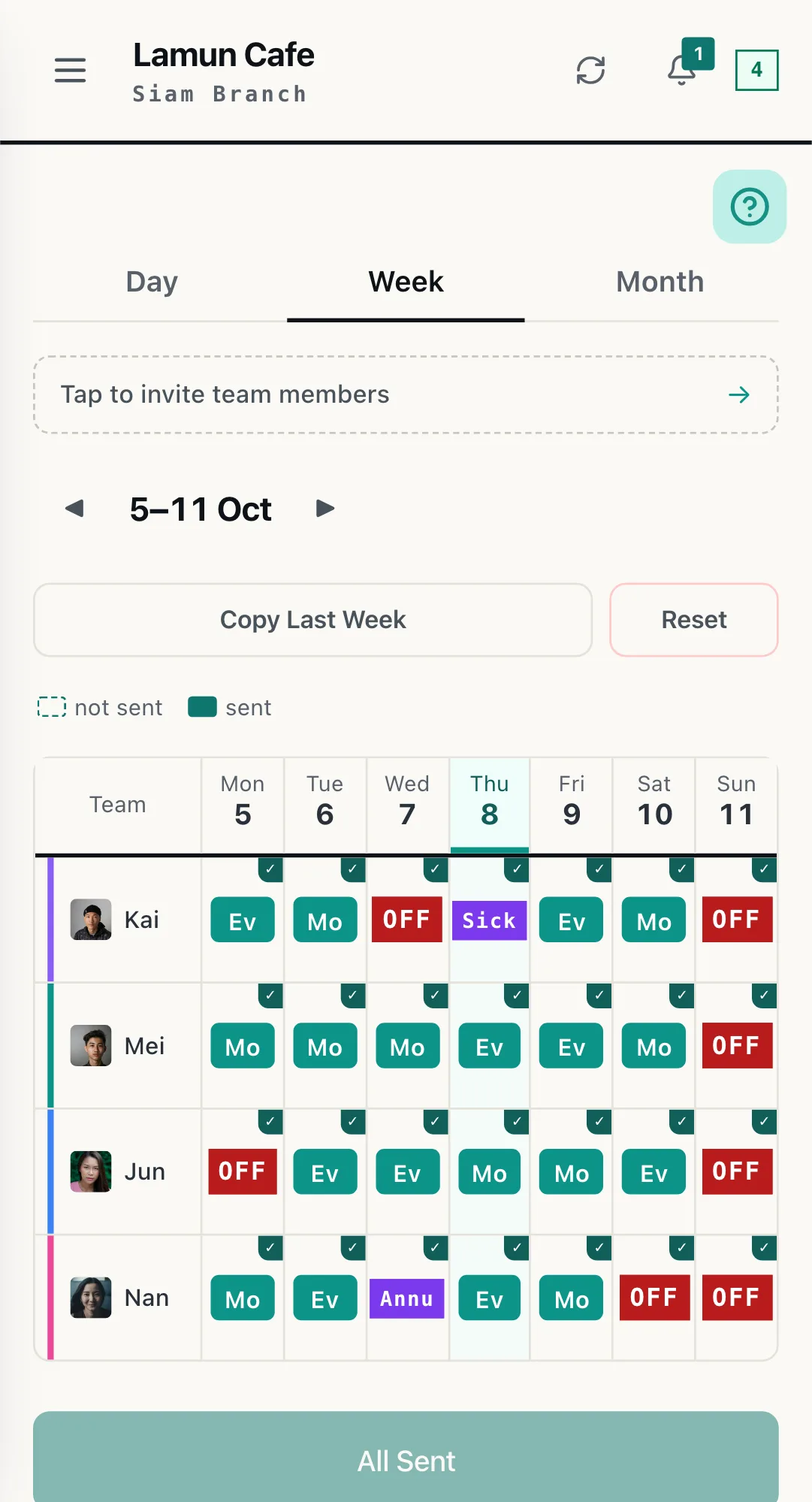
THE REAL SCREEN · SCHEDULE
In place of the Excel file and the group chat, the whole week sits in one grid. Copy last week, then send once.
4. Cost three: pay worked out by hand
A roster in a spreadsheet does not know the law. Applying the right rates is the owner's job, every pay period.
- Overtime on a working day: 1.5 times the hourly rate.
- Work on a holiday in normal hours: an extra 1x for monthly-paid staff, 2x for daily-paid staff.
- Overtime on a holiday: 3 times.
- Records: with 10 or more staff, pay and working-time records are kept for at least 2 years.
The full rules are in Thai labour law 101.
A wrong rate repeated every pay period adds up to back pay owed, and to trust lost with the team.
5. Cost four: the day you outgrow it
Free plans have a ceiling: a number of staff, one location, or the features you need next, such as payroll or exports. When you hire past it or open a second shop, you move: rebuild the roster, invite every staff member again, and keep the old records somewhere you can still find them. Moving is easier at 8 staff than at 30. Before you start, ask where the ceiling is and what moving out would take.
6. Cost five: one more app for the team
Any tool only works if every staff member opens it. A new app means a download, a password and reminders for the people who never set it up. Part-time staff and older staff are the ones who fall through. Ask: does every person need to install something, or can they use what is already on their phone?
7. When free is the right choice
If you have one shop, fewer than about five staff, shifts that rarely change and no overtime, a spreadsheet and a group chat are a fine choice. Keep a copy of every month's roster and hours: when a question about pay comes up, that copy is your answer.
8. Five questions to compare any option, free or paid
- How many hours a week will the roster, the changes and the month-end checks take me?
- Does each person get their own shifts, and do changes reach only the people affected?
- Are overtime and holiday pay worked out for me, from the hours actually worked?
- Where is the ceiling (staff, locations, features), and what would moving out take?
- Does every staff member have to install something new?
9. What WorkCo costs
WorkCo is free forever for small teams. Bigger teams get their first 60 days free, with every feature open and any number of staff. It runs inside LINE, so staff install nothing: each person gets their own shifts, checks in by GPS and asks for leave in the LINE they already use.
- The first 60 days: free, every feature open, any number of staff, no card. The roster sent into LINE, check in, leave, breaks, tasks and payroll.
- After that: a monthly price per store, based on the features you keep (for example, whether you run payroll in WorkCo). Message us on LINE and we will send you your price.
All your data stays. To keep using WorkCo after the 60 days, message us on LINE for your price. What the 60 free days include is on the free start page.
10. Frequently asked questions
Is there a free staff scheduling system?
Yes. A spreadsheet with a LINE group costs nothing, and many scheduling apps have a free plan with a limit on staff, locations or features. For one shop with a few staff on fixed shifts, free can be enough. As the team grows, the cost moves to the owner's hours, missed shift changes, pay worked out by hand and moving when you outgrow the tool.
Is Excel enough for staff scheduling?
For a small team with stable shifts, yes. Excel does not send each person their own shifts, does not know overtime or holiday rates and does not keep check-in times, so those jobs stay with the owner.
What does a free plan usually limit?
Usually the number of staff, the number of locations, or features such as payroll, exports or reports. Check the limit before you build on it, and ask what moving out would take.
Does WorkCo have a free plan?
WorkCo is free forever for small teams. Bigger teams get their first 60 days free, with every feature open, any number of staff and no card. After that you pay a monthly price per store, based on the features you keep. All your data stays, so there is nothing to move.
How do I work out what my roster costs me now?
Count the hours a week you spend building the roster, handling changes and checking hours at month end. Multiply by what an hour of your time is worth, then by 52. Compare any tool to that number, not to zero.

Put a number on your roster this week. Then add us on LINE and talk to a real person on our team.